


AR Phonics and SEND

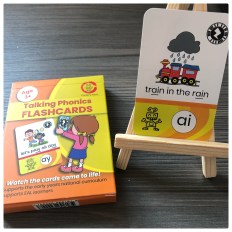
Developed by two teachers, who kindly sent me a pack to use at school these cards are pretty good as simple flashcards for use in your phonics lessons. Clear, well made and easy to use. However it is the innovative use of AR (Augmented reality) that brings these cards to life. This also changes the dynamic of how you may use the cards. As an SEN teacher I have the benefit of smaller classes and therefore access to an iPad for 1:1 work is easy to achieve.
Augmented Reality Phonics
Despite being a former ICT coordinator I am a bit of a cynic when it comes to technology in education (Edtech). It is really important to use technology wisely especially given the cost implications. Augmented Reality can be another educational gimmick or could represent an opportunity for teachers to embrace technology. Especially as most phones and tablets have AR capability built in. The Zappar app you need to install to use the AR functionality of these cards is free.


Using the flashcards.
I took these cards to work to trial with a few classes. I work in a PSCN need type special school (Profound, severe and complex needs). At any given time a significant proportion of the pupils will be working below age related expectations. For this reason older children will be accessing resources often designed for younger children (EYFS). Some Key Stage 4 children will be learning to blend for example. I address some of the arguments for using phonics to teach reading with autistic children in this post.
If I had one request it would be for images on the cards that would appeal to older children. When I write sensory stories I often use photos to try and address the age-appropriate debate. To overcome this I found a bit of a loophole. The Zapper app will remember a number of recent scans, so you can use the AR over an image other than the card. For the train (ai) card I was able to overlay the sounds and interactivity over an image of a train (see image). The “Zap code” you scan is in the top right corner of the card so if need be you could cover the main image with one you chose.


Phonics Cards Feedback
This is some of the feedback about the cards.
- The cards are colour coordinated to allow you to work through the stages of Phonics with ease (Orange to green)
- With many parents having a smartphone and the app being free a couple of cards can be sent home to help support reading at home.
- Parents do not need phonics knowledge.
- EAL children enjoyed using them as reading skills are not a barrier to access.
- Children could continue using the cards whilst the TA worked with another pupil.
- There is an engagement boost with the interactive sounds. Some children benefited from hearing the sound being produced consistently over and over.
- If a child leaves the classroom for an intervention the cards are easy to take.


What we would like to see developed
- An animated image within the app
- A poster/vocabulary board with multiple sounds.
- A sentence construction resource. For example the app could scan and read sound buttons
Thank you for reading!
